How a hotel or a group of hotels can run reservations, the room rack, check-in and checkout, folios and the night audit, housekeeping, restaurant bills charged to the room, revenue management and direct online bookings in Odoo 18, 19 and 20.
- Every department works on the same reservation, guest and folio, so room nights, extras, spa, events and restaurant bills end up on one bill at checkout.
- The night audit posts the room charges once and keeps occupancy, ADR and RevPAR for every business day.
- Start with the hotel app and add F&B, the booking engine and the website theme when you need them, or install the PMS, F&B and booking engine together.
Many hotels still run on a mix of tools. Bookings sit in one system, the room plan on a whiteboard, housekeeping on paper, the restaurant on its own till, and the accounts team copies all of it into the books at the end of the day. Every handover is a place where a minibar charge is missed, a dirty room is sold, or a restaurant bill never reaches the guest's folio.
The Viyug hotel suite puts every department of a hotel on the same reservation, guest and folio in Odoo. It is a small family of apps: the hotel management system itself, an F&B app for restaurants and bars, a booking engine for your website and a matching website theme. You can install them one by one, or the first three together with the Hotel Management All-in-One app.
Reservations and the room rack
The hotel app handles individual, group and waitlist bookings. Each booking has a rate plan, season, booking source and market segment, with deposit and cancellation policies that follow rules you set. Double booking of a room is blocked in the database, not just on the screen.
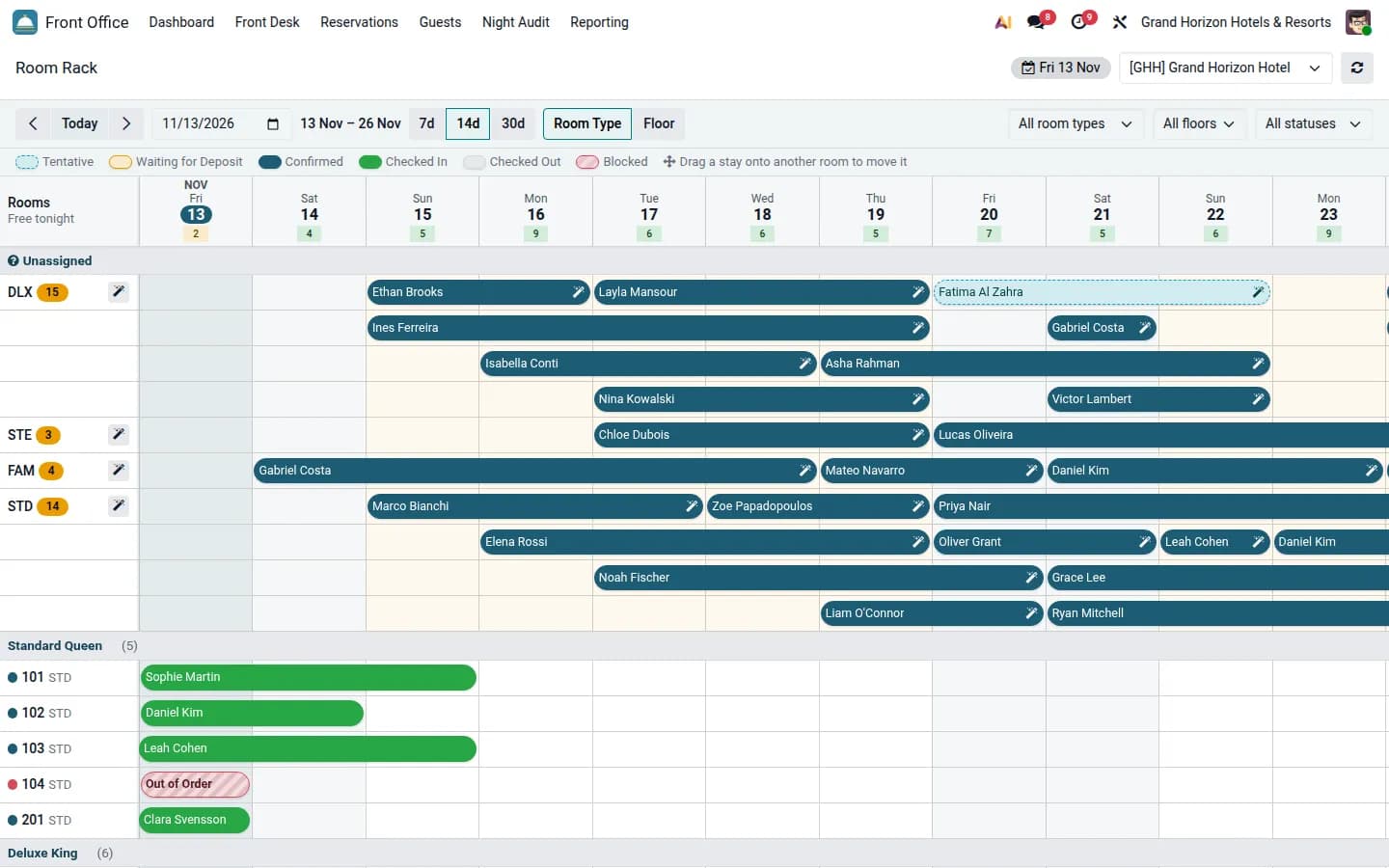
- A drag-and-drop room rack (tape chart) by room type or floor, for 7, 14 or 30 days, with unassigned stays on top.
- Drag a stay onto another room to move it; rooms out of order show as blocks.
- Guest profiles with VIP level and loyalty tier, and every message kept on the reservation.
- Several hotels in one database, each with its own rooms, rates, business date, time zone and payment journals.
Check-in, folios and checkout
The front desk dashboard shows arrivals, departures, in-house guests, occupancy, dirty rooms and balances due for the business date. Check-in is a short wizard: it checks nationality and the identity document, shows the deposit, prices early check-in and issues key cards. Late checkout fees and registration cards are part of the same flow.
Room nights, services and outlet charges all land on a folio: one for the guest, the company or the group. The cashier can split and transfer charges, post to the city ledger and run cashier sessions, and checkout collects the balance and creates the invoice in Odoo Accounting.
The night audit
Each business day is closed once. The night audit checks pending arrivals and due-outs, posts the room charges a single time, and records rooms sold, guests in house, arrivals, no-shows, room and other revenue, ADR and RevPAR for the day. The list of what the audit did stays with the day, so the numbers can be traced later.
Housekeeping and maintenance
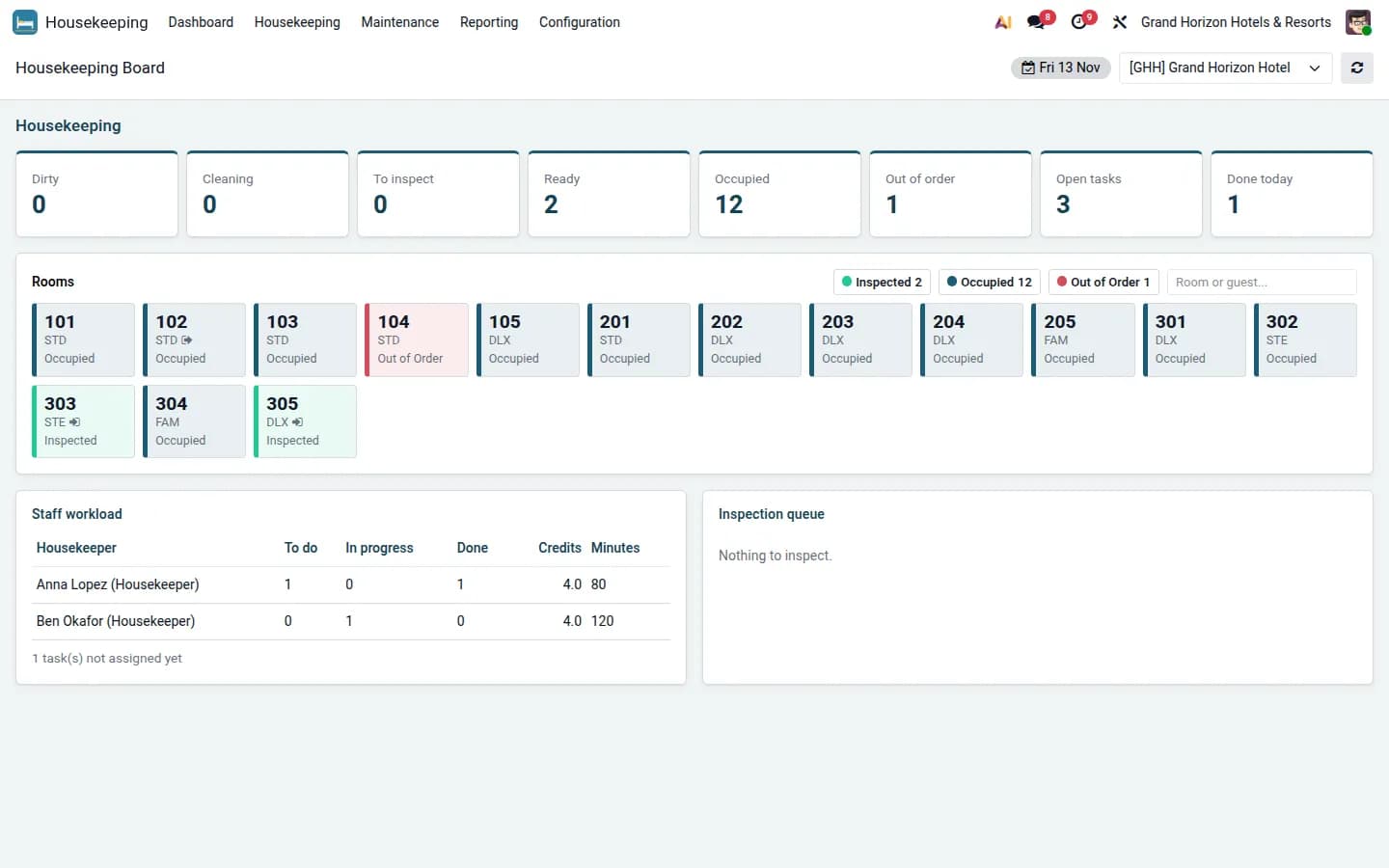
A checkout turns the room dirty and creates the cleaning task. The housekeeping board shows every room by status (dirty, cleaning, to inspect, ready, occupied, out of order), the workload of each housekeeper with credits and minutes, and the inspection queue. Tasks have checklists, and lost and found is tracked in the same app.
Maintenance covers corrective and preventive work orders, equipment, schedules and teams. A corrective request on a room blocks it on the room rack until it is fixed, so the front desk cannot sell it by mistake.
Restaurant, bar and room service
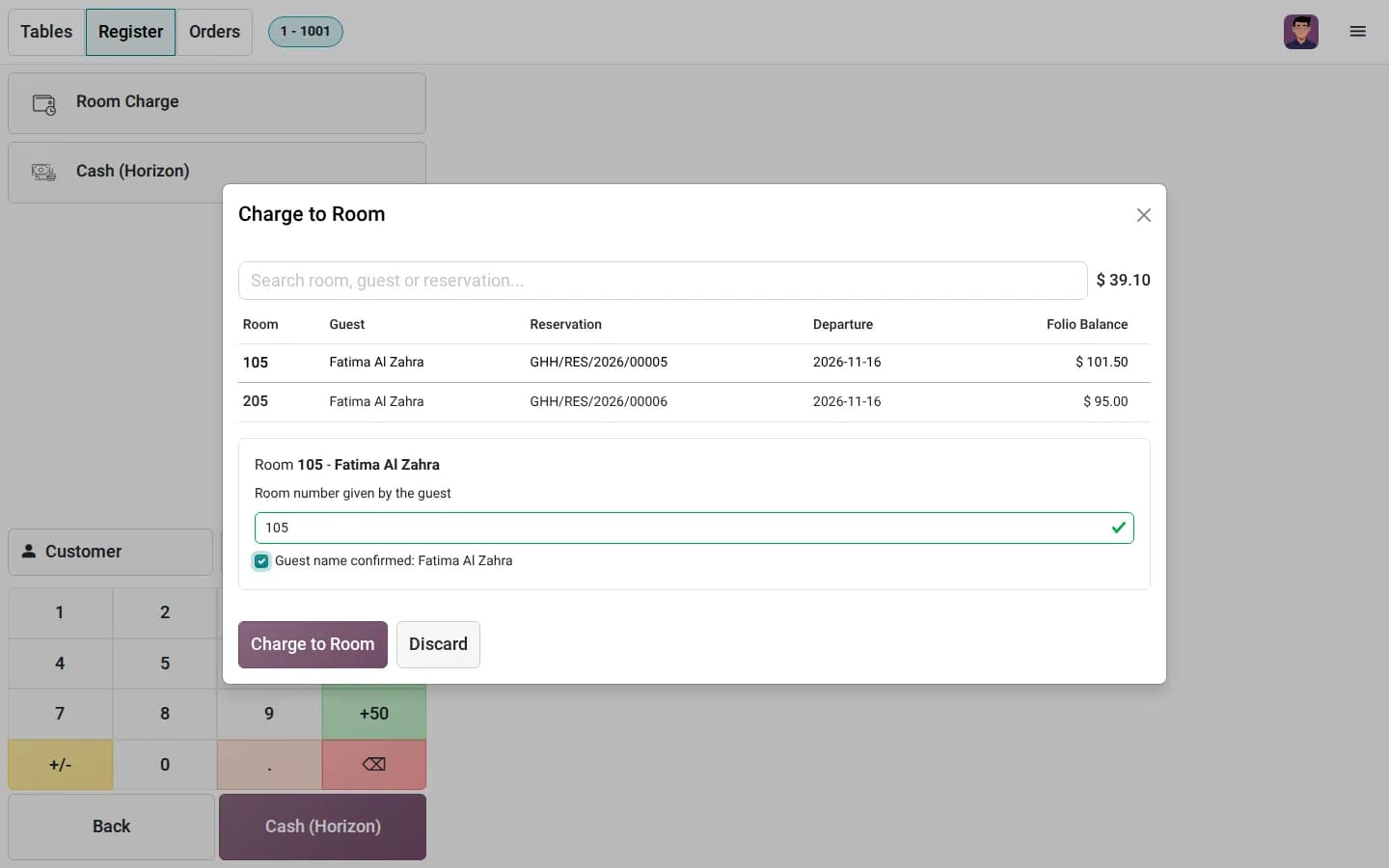
The Hotel F&B app connects Odoo Point of Sale to the hotel. Restaurant, bar, cafe, room service, banquet and minibar outlets each get their own POS. When a guest says "put it on my room", the waiter picks Room Charge, chooses the in-house guest, types the room number the guest gives and confirms the name. The bill then goes to the guest's folio, next to the room nights, and is paid at checkout. Each POS can have a room charge limit.
- Table reservations per outlet with covers, time and occasion, linked to the hotel stay.
- Kitchen and bar tickets by preparation station.
- Recipes with waste %, cost per portion and food cost %, and menu engineering (star, plowhorse, puzzle, dog).
- Department stores with stock requests, and purchase requests with one or two approvals, quotation comparison and supplier evaluation.
Spa, events and guest messages
Spa treatments and classes are booked with therapists, rooms and buffer times, and billed to the room folio. Events and banquets go from inquiry to proposal to contract, with venues, catering, equipment, banquet event orders (BEO), deposits and event profitability; with CRM installed, event inquiries also become opportunities.
Guest messages for confirmation, pre-arrival, welcome, checkout, invoice, feedback and birthdays go out by rule, by email, SMS, WhatsApp or push, and every message is logged. Guests can check in online before they arrive.
Revenue management and the channel manager
The revenue dashboard compares rooms on the books with history and forecast, shows pickup per stay date and competitor rates, and proposes rates from your pricing rules. A recommended rate is applied only after someone approves it.
The channel manager connector maps room types and rate plans, sends availability, rates and restrictions through a queue with retry, receives bookings by webhook and keeps a reconciliation view. It works with channel managers that exchange JSON over webhooks. A REST API with scoped clients serves your own apps and kiosks.
Direct bookings on your own website
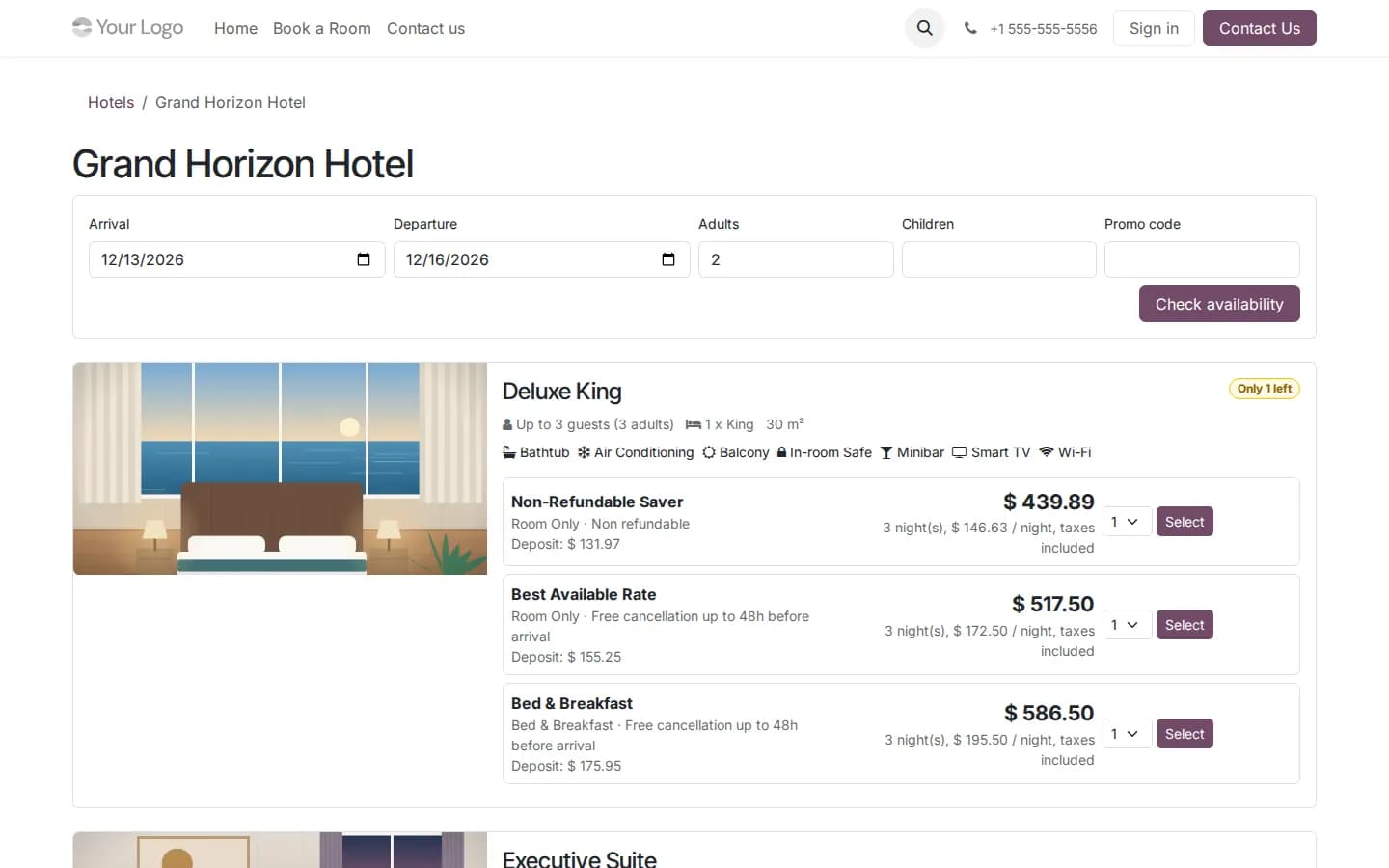
The Hotel Booking Engine sells rooms on your Odoo website without a commission. Guests search by dates, guests and promo code, see room types with photos and amenities and every published rate with its policy and deposit, add extras such as breakfast, parking or transfers, and pay the deposit with any payment provider enabled in Odoo. The reservation is created and confirmed in the hotel app straight away.
In the guest portal, guests see their stays, ask to change dates or cancel with the policy fee shown first, and complete online check-in a week before arrival with their document and signature. Prices are checked again on the server, and every guest link carries an access token. The Hotel & Resort Website Theme adds a full hotel website around it: 8 ready pages, 14 hotel building blocks and four colour palettes, one of them dark, with booking pages in the same style.
Reports, roles and AI
Seven dashboards cover the front desk, the general manager, revenue, housekeeping, spa and events, and multi-property BI with occupancy, ADR, RevPAR, TRevPAR, GOP and GOPPAR per property and a benchmark ranking. Each of the 25 hotel roles, from housekeeper to group manager, sees only its own apps and records.
The built-in assistant answers questions about occupancy, ADR, RevPAR and revenue from your own figures and shows its evidence. The forecast, upsell offers and review sentiment run inside Odoo; an AI provider is optional, and if you add one, only aggregated figures are sent and every request is logged. Guest identity documents are visible only to an authorised group, and every access to sensitive data is logged.
Try it on a live demo
The demo is a fictional hotel group, Grand Horizon Hotels & Resorts, with the whole suite and the website theme installed on Odoo 20 Enterprise and three weeks of hotel activity. The home page of hotel-demo.viyuginfotech.com is the hotel website with the booking engine, and hotel-demo.viyuginfotech.com/try-demo opens the backend without a login as the hotel manager.
Pick the apps you need
- Hotel Management System (viyug_hotel): reservations, front desk, folios, night audit, housekeeping, maintenance, spa, events, revenue, channel manager, guest messaging, API, AI and BI. 159 EUR.
- Hotel F&B (viyug_hotel_fnb): restaurant and bar POS with room charge, recipes and food cost, stores and purchasing. 49 EUR.
- Hotel Booking Engine (viyug_hotel_website): direct bookings, online deposit, guest portal and online check-in. 39 EUR.
- Hotel & Resort Website Theme (theme_viyug_hotel): the hotel website and booking pages. 49 EUR.
- Hotel Management All-in-One (viyug_hotel_all): installs the first three apps together, 248 EUR in total.
Prices are the list prices of each app set by us in euros; the Odoo App Store shows them in your currency and adds the price of any app a module depends on. All apps run on Odoo 18, 19 and 20, Community and Enterprise, use only Community apps, follow the Enterprise dark mode and are translated into Arabic, German, Spanish and French.
If you want help with the setup, loading your rooms and rate plans, moving guest history from your current system or connecting your channel manager and door locks, tell us how your hotel runs today.
Frequently asked questions
Which Odoo versions and editions does it support?
Odoo 18, 19 and 20, Community and Enterprise. The apps need only Community apps, such as Invoicing, Employees, Contacts and Portal for the hotel app, and Point of Sale, Inventory and Purchase for F&B.
Can we run several hotels in one database?
Yes. Each property has its own rooms, rates, business date, time zone and payment journals. Properties can sit in one or several companies, and regions and brands group them for the portfolio dashboard and the benchmark.
How is a wrong room charge from the restaurant prevented?
Only in-house guests are listed, the waiter must type the room number the guest gives and confirm the guest name, and each POS can have a room charge limit.
Which channel managers can it connect to?
The connector exchanges availability, rates, restrictions and reservations as JSON over webhooks, so it works with channel managers that offer such an interface. Each connection keeps a queue with retry, a message log and a reconciliation view.
Does the AI send our data anywhere?
Not by default. The forecast, upsell offers, review sentiment and the assistant run inside Odoo. If you add an AI provider, only aggregated figures are sent and every request is logged.
Can I try it before buying?
Yes. The live demo opens without a login as the manager of a demo hotel group on Odoo 20 Enterprise, and the demo's home page shows the hotel website with the booking engine.
Can you help us set it up?
Yes. We can set up your properties, rooms and rate plans, import guests and bookings from your current system and connect your channel manager, payment provider and door locks. Tell us what you run today on the contact page.